
Why us
Our invoicing platform is Guru
Guru is a modern invoicing platform built for freelancers and light entrepreneurs in Finland. It simplifies invoicing without a Business ID, and works with one too.
Built for the person invoicing
The features that matter
- Invoice management. Create, send and track invoices. The dashboard shows the status of each one: pending, paid or overdue.
- Financial overview. Your invoicing and your remittances in a single view.
- Expenses and reports. Log the costs you bill on and the ones you deduct, attach them to an invoice, and download your register as CSV.
- No Business ID required. Registration is free and carries no ongoing costs or obligations.
Guru is built to be navigable by people who would not call themselves technical. You log in, fill in the invoice details and send it to your client. The payment is processed and transferred to your bank account as salary.
The platform supports a wide range of trades, from construction to designers and bloggers. You choose your clients and set your own price.
Inside Guru
What it looks like
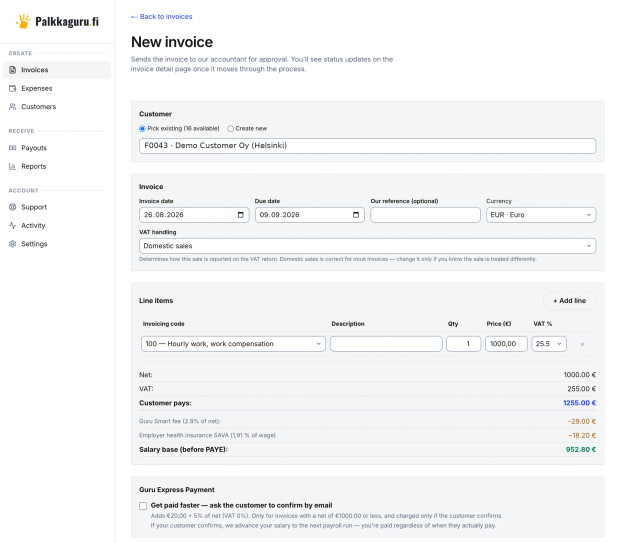
Every deduction while you type
You pick the customer, the invoicing code and the amount. The service fee, the employer's health insurance contribution and what is left as your fee are worked out on the same screen, before the invoice goes out.
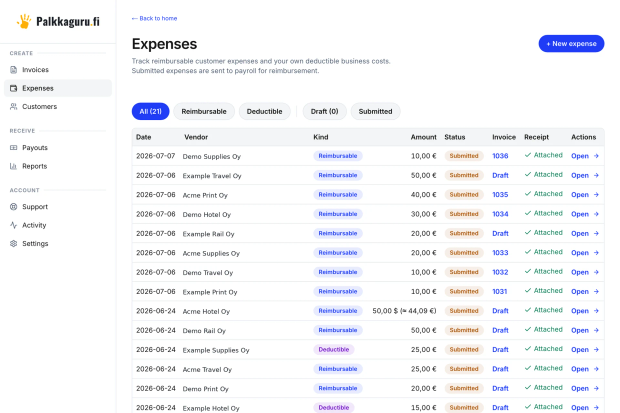
Costs logged, billed on or deducted
Log a cost once with its receipt, mark it as one you bill on to the customer or one you deduct, and attach it to the invoice it belongs to. The register downloads as CSV.
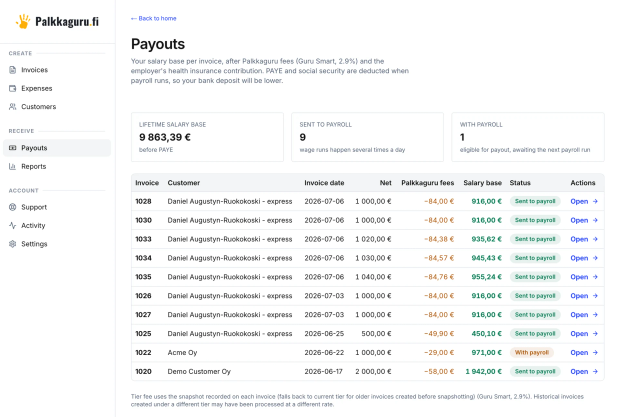
What each invoice left you
Every invoice with its fee, its fee base and where it has got to in the payment run. Tax and social security come off when payment runs, which is why the bank deposit is smaller than the fee base.
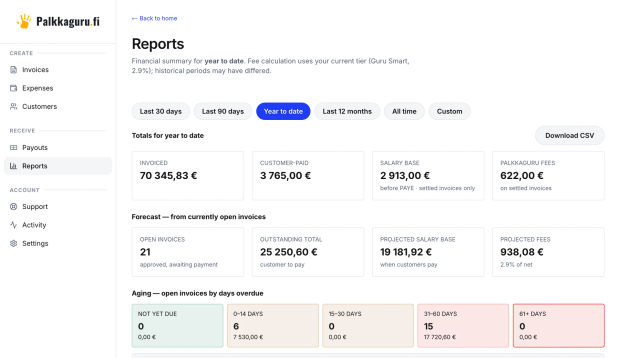
The year so far, and what is still out
Invoiced, paid, fee base and fees for the period you choose, the forecast from invoices still open beside them, and what is overdue grouped by how late it is. Each table downloads as CSV.
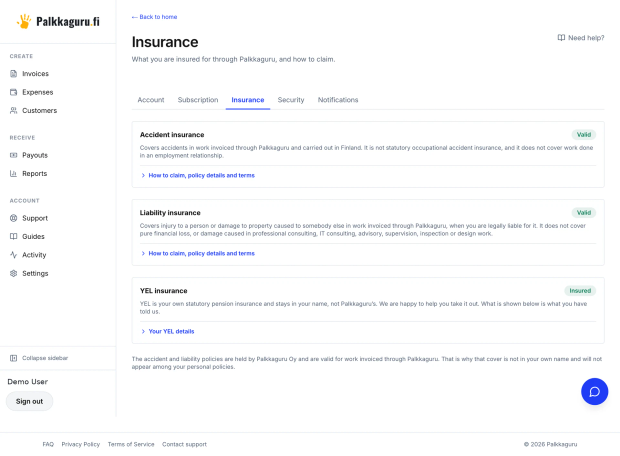
Your cover, and how to claim
Accident and liability cover, whether they are valid and what to do if something happens, on the plans that include them. YEL stays in your own name, and what is shown is what you have told us.
Frequently asked
- Do I need to install anything?
- No. Guru runs in the browser at app.palkkaguru.fi, on a phone as well as a laptop, and there is nothing to download or keep updated.
- What does it cost to have an account?
- Nothing. Registration is free and there is no monthly fee. The service fee is charged per invoice, so an account can sit idle between commissions without costing you anything.
- Where is my tax card, if it is not in Guru?
- Withholding follows your tax card and we can retrieve the card for you, but that part is handled in the payment run rather than in the portal. That is why there is no tax card tab in Guru.

Tell us what you invoice, and we will work out which plan fits.
A free conversation, at our office or online. We go through whether light entrepreneurship makes sense in your situation, which plan works out cheapest for what you invoice, and whether you want the accident and liability cover. The conversation commits you to nothing.